AI/ML Model Training Guide
By ProStation Systems Team ·

AI/ML Model Training: How to Build a Custom Workstation – Complete Specification Guide
Introduction
Artificial Intelligence and Machine Learning have become essential across industries, from startups and research labs to enterprise organizations. Whether you're training machine learning models, fine-tuning large language models (LLMs), building computer vision applications, or running deep learning experiments, standard desktop computers often struggle to handle these demanding workloads.
AI workloads require much more than a powerful processor. They depend heavily on GPU performance, memory capacity, storage speed, and system stability during long training sessions. This is why a custom-built AI workstation is often the best investment for developers, researchers, and businesses.
Unlike off-the-shelf desktop PCs, a custom workstation is designed around your specific workload, ensuring maximum performance without paying for unnecessary hardware. This guide explains how to choose the right components for your AI workstation and helps you decide which configuration best suits your requirements.
Artificial Intelligence and Machine Learning have become essential across industries, from startups and research labs to enterprise organizations. Whether you're training machine learning models, fine-tuning large language models (LLMs), building computer vision applications, or running deep learning experiments, standard desktop computers often struggle to handle these demanding workloads.
AI workloads require much more than a powerful processor. They depend heavily on GPU performance, memory capacity, storage speed, and system stability during long training sessions. This is why a custom-built AI workstation is often the best investment for developers, researchers, and businesses.
Unlike off-the-shelf desktop PCs, a custom workstation is designed around your specific workload, ensuring maximum performance without paying for unnecessary hardware. This guide explains how to choose the right components for your AI workstation and helps you decide which configuration best suits your requirements.
Why a Custom Workstation Matters for AI Training
Training AI models is one of the most resource-intensive computing tasks. While many users focus only on the processor, modern AI frameworks rely primarily on GPU acceleration.
A well-balanced AI workstation should include:
-
A high-performance GPU for model training and inference
-
ECC RAM for improved stability and memory reliability
-
Fast NVMe SSD storage for datasets and checkpoints
-
Efficient cooling for sustained performance
-
A reliable power supply capable of handling continuous heavy workloads
Pre-built desktop systems are designed for general-purpose computing and may not provide the flexibility or upgrade options required for AI development. A custom workstation allows every component to be selected based on your workload, reducing bottlenecks and improving long-term scalability.
Training AI models is one of the most resource-intensive computing tasks. While many users focus only on the processor, modern AI frameworks rely primarily on GPU acceleration.
A well-balanced AI workstation should include:
- A high-performance GPU for model training and inference
- ECC RAM for improved stability and memory reliability
- Fast NVMe SSD storage for datasets and checkpoints
- Efficient cooling for sustained performance
- A reliable power supply capable of handling continuous heavy workloads
Pre-built desktop systems are designed for general-purpose computing and may not provide the flexibility or upgrade options required for AI development. A custom workstation allows every component to be selected based on your workload, reducing bottlenecks and improving long-term scalability.
Choosing the Right GPU for AI and Machine Learning
The graphics card is the most important component of any AI workstation. The larger and more complex your models become, the more GPU memory and computing power you will need.
RTX Series GPUs
RTX graphics cards are an excellent choice for beginners and professionals working on small to medium-sized AI projects.
They are ideal for:
-
Machine learning development
-
Deep learning experimentation
-
Computer vision applications
-
AI inference
-
Small LLM fine-tuning
RTX-based workstations provide excellent performance while maintaining a balanced price-to-performance ratio.
RTX graphics cards are an excellent choice for beginners and professionals working on small to medium-sized AI projects.
They are ideal for:
- Machine learning development
- Deep learning experimentation
- Computer vision applications
- AI inference
- Small LLM fine-tuning
RTX-based workstations provide excellent performance while maintaining a balanced price-to-performance ratio.
NVIDIA A-Series GPUs
NVIDIA A-Series GPUs are designed for professional AI workloads that require higher reliability and larger memory capacity.
These GPUs are best suited for:
-
Professional AI development
-
Research laboratories
-
Large datasets
-
Production-level machine learning
-
Long-duration training sessions
They offer improved stability and are commonly used in enterprise workstation environments.
NVIDIA A-Series GPUs are designed for professional AI workloads that require higher reliability and larger memory capacity.
These GPUs are best suited for:
- Professional AI development
- Research laboratories
- Large datasets
- Production-level machine learning
- Long-duration training sessions
They offer improved stability and are commonly used in enterprise workstation environments.
Data Center and Enterprise GPUs
Enterprise GPUs such as NVIDIA Tesla or other data-center-class accelerators are designed for demanding AI workloads and multi-GPU deployments.
These solutions are ideal for:
-
Large Language Models (LLMs)
-
Enterprise AI platforms
-
Multi-GPU training
-
Production AI infrastructure
-
Large-scale deep learning pipelines
Although they require a larger investment, they deliver the performance needed for enterprise-grade AI applications.
Enterprise GPUs such as NVIDIA Tesla or other data-center-class accelerators are designed for demanding AI workloads and multi-GPU deployments.
These solutions are ideal for:
- Large Language Models (LLMs)
- Enterprise AI platforms
- Multi-GPU training
- Production AI infrastructure
- Large-scale deep learning pipelines
Although they require a larger investment, they deliver the performance needed for enterprise-grade AI applications.
How Much RAM and Storage Do You Need?
Memory and storage play a critical role in AI and machine learning workflows. Large datasets, notebooks, preprocessing tasks, vector databases, checkpoints, and parallel workloads all consume significant system resources.
ECC memory is recommended for professional AI work because it improves stability and helps prevent memory-related errors during long training sessions.
Fast NVMe SSDs also reduce data loading times and improve overall workflow efficiency.
Memory and storage play a critical role in AI and machine learning workflows. Large datasets, notebooks, preprocessing tasks, vector databases, checkpoints, and parallel workloads all consume significant system resources.
ECC memory is recommended for professional AI work because it improves stability and helps prevent memory-related errors during long training sessions.
Fast NVMe SSDs also reduce data loading times and improve overall workflow efficiency.
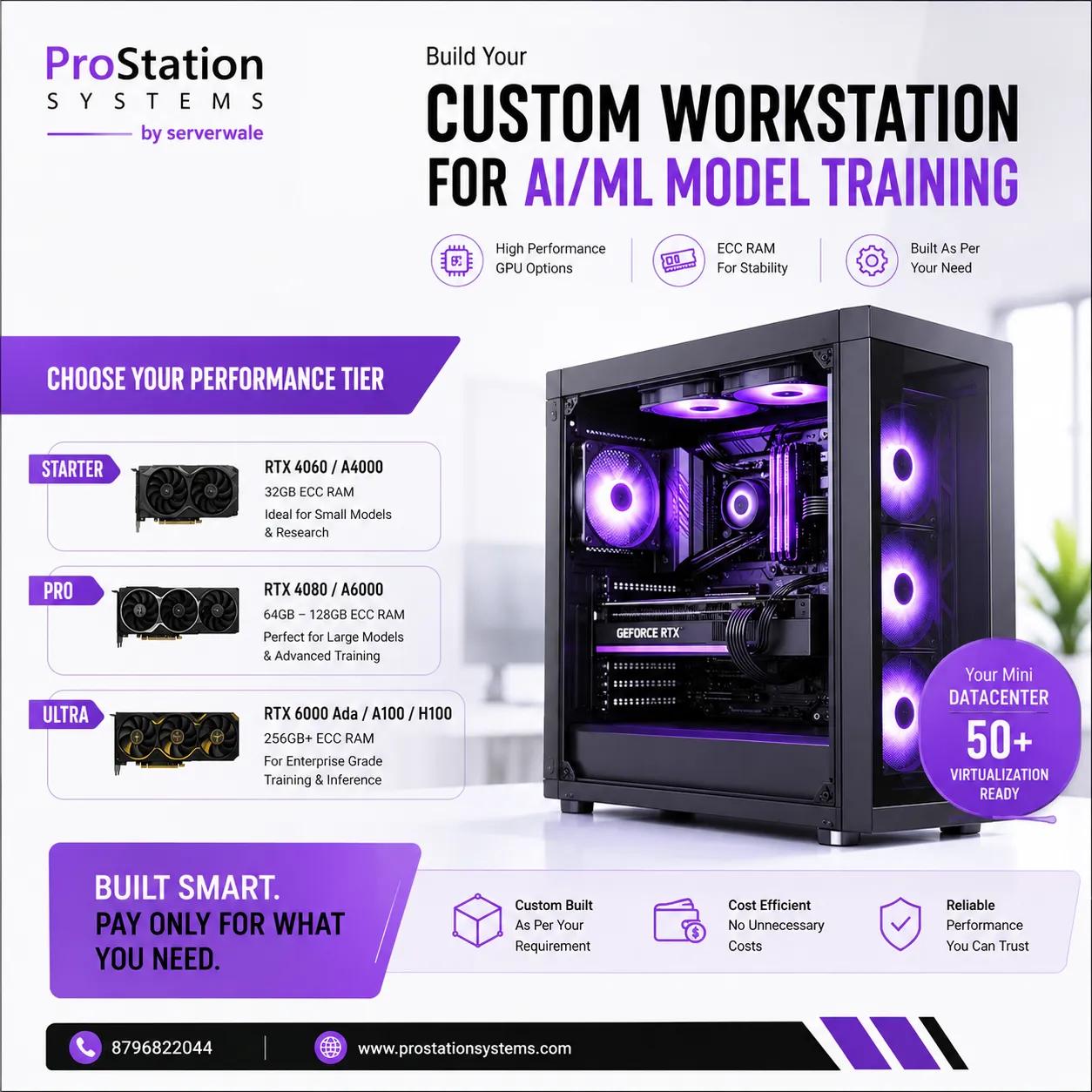
Recommended AI Workstation Configurations
Starter Workstation
Recommended for:
-
Students
-
AI beginners
-
Small machine learning projects
-
AI experimentation
Suggested Configuration:
-
Entry or mid-range RTX GPU
-
32–64 GB RAM
-
1 TB NVMe SSD
This configuration provides an affordable entry point for learning AI and developing smaller models.
Recommended for:
- Students
- AI beginners
- Small machine learning projects
- AI experimentation
Suggested Configuration:
- Entry or mid-range RTX GPU
- 32–64 GB RAM
- 1 TB NVMe SSD
This configuration provides an affordable entry point for learning AI and developing smaller models.
Pro Workstation
Recommended for:
-
Machine learning engineers
-
AI developers
-
Research teams
-
Professional AI development
Suggested Configuration:
-
High-end RTX or NVIDIA A-Series GPU
-
64–128 GB ECC RAM
-
2 TB NVMe SSD with additional storage
This setup is ideal for larger datasets, multiple development environments, and more demanding training workloads.
Recommended for:
- Machine learning engineers
- AI developers
- Research teams
- Professional AI development
Suggested Configuration:
- High-end RTX or NVIDIA A-Series GPU
- 64–128 GB ECC RAM
- 2 TB NVMe SSD with additional storage
This setup is ideal for larger datasets, multiple development environments, and more demanding training workloads.
Ultra Workstation
Recommended for:
-
Enterprise AI
-
Large Language Models
-
Multi-GPU deployments
-
Production AI environments
Suggested Configuration:
-
NVIDIA A-Series or enterprise GPU
-
128–256 GB or more ECC RAM
-
Multiple NVMe SSDs with RAID or high-capacity storage
Ultra workstations are designed for organizations running continuous AI workloads where reliability, scalability, and performance are essential.
Recommended for:
- Enterprise AI
- Large Language Models
- Multi-GPU deployments
- Production AI environments
Suggested Configuration:
- NVIDIA A-Series or enterprise GPU
- 128–256 GB or more ECC RAM
- Multiple NVMe SSDs with RAID or high-capacity storage
Ultra workstations are designed for organizations running continuous AI workloads where reliability, scalability, and performance are essential.
Which Workstation Tier Is Right for You?
Choosing the right workstation depends entirely on your workload rather than your budget.
A Starter workstation is suitable for learning AI, building personal projects, and training smaller models.
A Pro workstation is ideal for developers, researchers, and businesses that require consistent performance for larger datasets and production-level development.
An Ultra workstation is designed for organizations training large AI models, running multiple GPUs, or managing enterprise-scale AI infrastructure.
The best workstation is not necessarily the most expensive one—it is the one that matches your current requirements while allowing room for future upgrades.
Choosing the right workstation depends entirely on your workload rather than your budget.
A Starter workstation is suitable for learning AI, building personal projects, and training smaller models.
A Pro workstation is ideal for developers, researchers, and businesses that require consistent performance for larger datasets and production-level development.
An Ultra workstation is designed for organizations training large AI models, running multiple GPUs, or managing enterprise-scale AI infrastructure.
The best workstation is not necessarily the most expensive one—it is the one that matches your current requirements while allowing room for future upgrades.
Why Choose ProStation Systems?
Building an AI workstation requires more than simply selecting powerful hardware. Every component must work together efficiently to deliver stable, long-term performance.
ProStation Systems specializes in custom-built AI and machine learning workstations designed around your specific workload rather than generic hardware configurations.
Building an AI workstation requires more than simply selecting powerful hardware. Every component must work together efficiently to deliver stable, long-term performance.
ProStation Systems specializes in custom-built AI and machine learning workstations designed around your specific workload rather than generic hardware configurations.
Why Professionals Choose ProStation Systems
-
Custom-built AI workstations tailored to your requirements
-
Hardware selected specifically for your AI workloads
-
No unnecessary spending on components you don't need
-
Professional guidance before purchase
-
Enterprise-grade build quality
-
Efficient cooling and power delivery
-
Easy future upgrades and expansion
Unlike many pre-built workstations, custom systems provide greater flexibility and can evolve as your AI projects become more demanding.
- Custom-built AI workstations tailored to your requirements
- Hardware selected specifically for your AI workloads
- No unnecessary spending on components you don't need
- Professional guidance before purchase
- Enterprise-grade build quality
- Efficient cooling and power delivery
- Easy future upgrades and expansion
Unlike many pre-built workstations, custom systems provide greater flexibility and can evolve as your AI projects become more demanding.
Key Features of a High-Performance AI Workstation
A reliable AI workstation should include:
-
High-VRAM professional GPU
-
ECC memory for maximum stability
-
High-speed NVMe SSD storage
-
Efficient thermal management
-
Reliable power supply with sufficient headroom
-
Upgrade-friendly architecture
These components work together to ensure consistent performance during long AI training sessions.
A reliable AI workstation should include:
- High-VRAM professional GPU
- ECC memory for maximum stability
- High-speed NVMe SSD storage
- Efficient thermal management
- Reliable power supply with sufficient headroom
- Upgrade-friendly architecture
These components work together to ensure consistent performance during long AI training sessions.
Final Recommendation
If you are planning to build a custom PC for AI training or searching for a workstation for machine learning in India, focus on selecting hardware based on your actual workload rather than marketing specifications.
The right combination of GPU, memory, storage, cooling, and power delivery will significantly improve training speed, reliability, and long-term scalability.
A custom-built workstation offers better value because every component is selected specifically for your AI applications instead of following a one-size-fits-all approach.
ProStation Systems helps developers, researchers, startups, and enterprises build AI workstations optimized for machine learning, deep learning, computer vision, and LLM training.
If you are planning to build a custom PC for AI training or searching for a workstation for machine learning in India, focus on selecting hardware based on your actual workload rather than marketing specifications.
The right combination of GPU, memory, storage, cooling, and power delivery will significantly improve training speed, reliability, and long-term scalability.
A custom-built workstation offers better value because every component is selected specifically for your AI applications instead of following a one-size-fits-all approach.
ProStation Systems helps developers, researchers, startups, and enterprises build AI workstations optimized for machine learning, deep learning, computer vision, and LLM training.
Get Expert Assistance
Looking for a custom AI/ML workstation designed specifically for your workload?
Call: +91 87968 22044
Get expert guidance and build a workstation optimized for AI training, machine learning, deep learning, and enterprise AI applications.
Looking for a custom AI/ML workstation designed specifically for your workload?
Call: +91 87968 22044
Get expert guidance and build a workstation optimized for AI training, machine learning, deep learning, and enterprise AI applications.